

Step 5 of 6 · 3 minutes
Connect Facebook and Instagram.
Facebook and Instagram leads land in your CRM.
Watch first1 minute
Then do it below, one part at a time.
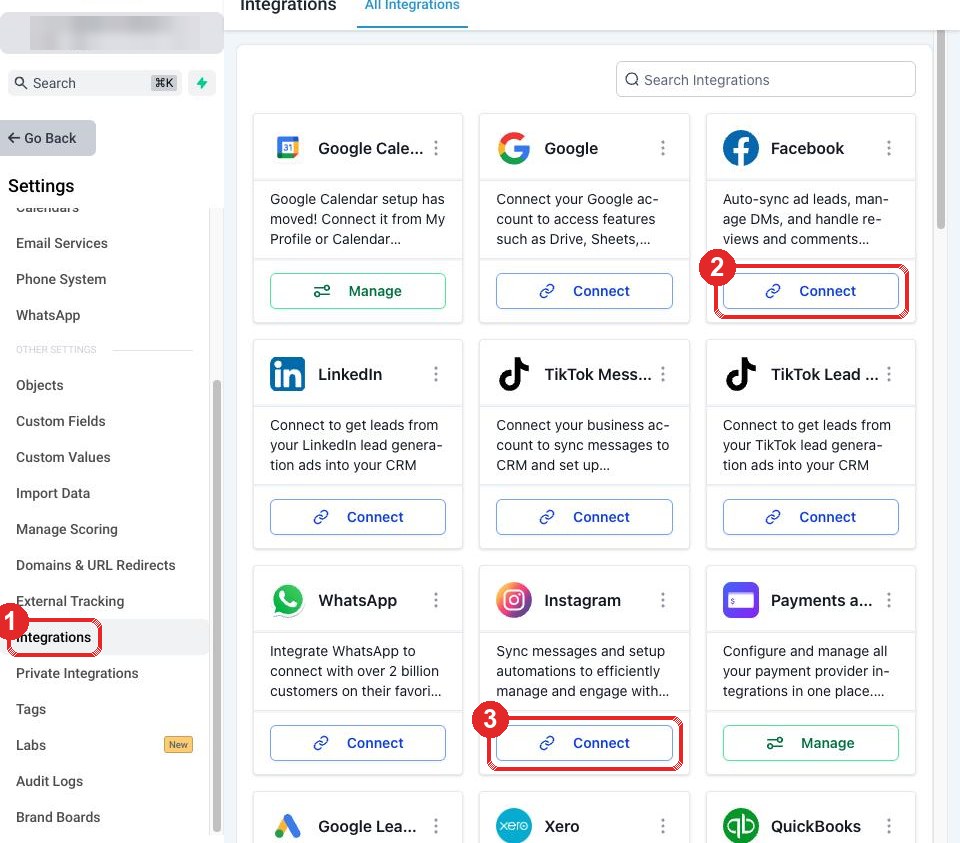
1Open Integrations
Click the gear at the bottom left of your CRM.
- Integrations (left menu)
- Facebook: Connect
2In the Facebook window
- Log in with the Facebook that runs your page
- Leave every switch on
- Choose your page, finish
3Connect Instagram
- Instagram: Connect, then approve
Instagram must be a Professional account linked to your page.
4Reply to us
Reply Done to our email.
Stuck? Reply STUCK to our email with a screenshot, or see the Step 5 questions.